

Monitor Arm UK – How to Choose the Best Desk Mount
Looking for the best monitor arm in the UK? Compare single and dual monitor arms, desk mounting options and popular Ergotron models. Discover essential features, VESA compatibility and practical buying tips for your home office.
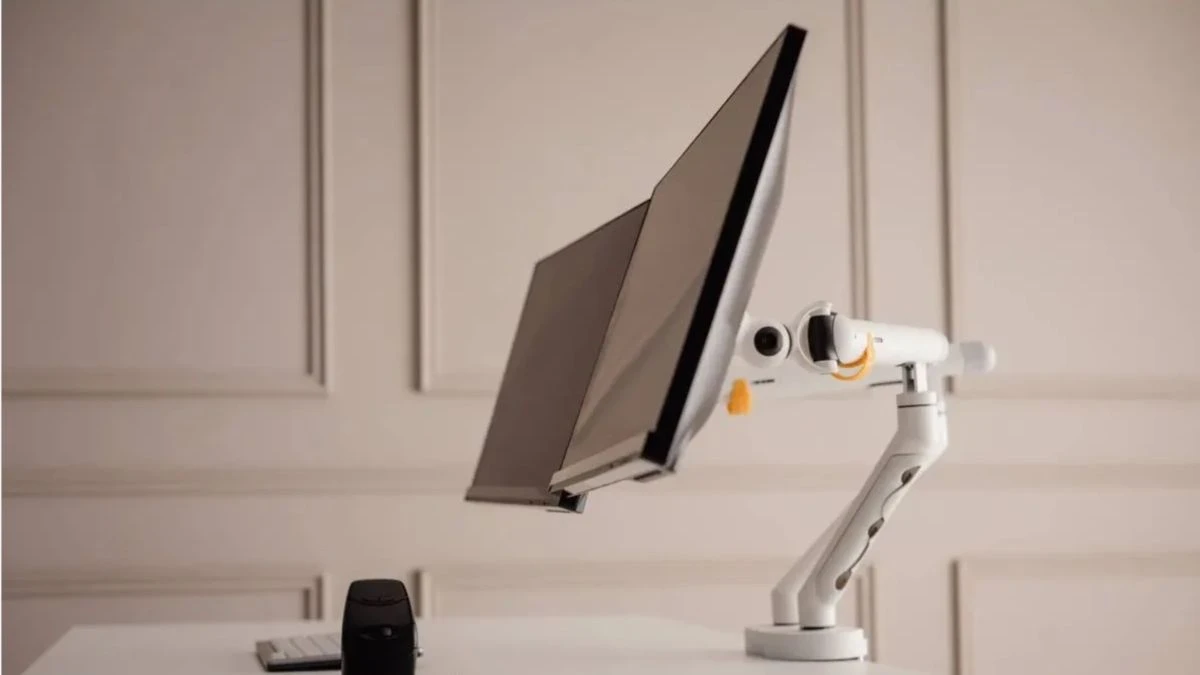
Monitor Arm UK – A Practical Guide to Choosing the Right Desk Mount
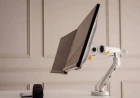
A monitor arm is a useful addition to a home office, gaming setup or professional workstation. It allows you to position your screen at a more comfortable height and angle while freeing up valuable desk space. Whether you use one display or several, choosing the right monitor arm can make your workspace more organised and easier to adjust.
In the UK, buyers can choose from a wide range of options, including single monitor arms, dual monitor mounts, gas spring designs and premium products from brands such as Ergotron. However, not every model is suitable for every monitor or desk.
Before purchasing, it is important to consider screen size, monitor weight, VESA compatibility, desk thickness and the type of adjustment mechanism.
This guide explains the main types of monitor arms, what to look for and how to find a suitable option for your workstation.
What Is a Monitor Arm?
A monitor arm is an adjustable support that attaches a computer monitor to a desk, wall or another compatible mounting surface. Unlike a traditional monitor stand, it allows you to move the screen into different positions without repeatedly lifting the entire display.
Most desk-mounted models use a clamp or a grommet fitting. The monitor attaches to the arm through a VESA mounting plate, provided the display supports a compatible mounting pattern.
Common benefits include:
-
More usable space on the desk.
-
Adjustable screen height and viewing angle.
-
Easier positioning for sitting or standing work.
-
Better organisation of monitor cables.
-
Flexible arrangements for single or multiple displays.
A properly adjusted monitor arm can also help you maintain a more comfortable viewing position throughout the working day.
Types of Monitor Arms Available in the UK
Monitor arms are available in several designs. Understanding the differences can help you avoid buying a product that does not suit your workstation.
Single Monitor Arm
A single monitor arm is designed to hold one display. It is a practical option for home offices, study desks and gaming setups where only one screen is required.
Many single monitor arms offer height adjustment, screen rotation, tilt and swivel movement. Some use gas springs to make repositioning easier, while simpler models rely on manual adjustments.
A single monitor arm may be suitable if you:
-
Use one main display for work or study.
-
Want to free up space beneath your monitor.
-
Need to adjust your screen throughout the day.
-
Have a smaller desk with limited mounting space.
Before purchasing, check the arm's weight capacity and supported screen dimensions.
Dual Monitor Arm
A dual monitor arm allows you to mount two displays using one desk attachment. It can be particularly useful for people who work with spreadsheets, editing software, coding tools or multiple applications.
Instead of using two separate monitor stands, both screens can be positioned using one mounting system.
When choosing a dual monitor arm, check the supported weight per arm rather than relying only on the combined maximum capacity. You should also consider whether the displays can be arranged side by side or vertically.
Some dual mounts offer independent adjustment for each screen, making it easier to position monitors of slightly different sizes.
Gas Spring Monitor Arm
A gas spring monitor arm uses a spring-assisted mechanism to support the screen and make adjustments smoother.
This design can be useful if you frequently change your monitor's position during the day. It generally allows easier height and angle adjustments than basic fixed-friction mounts.
However, the monitor's weight must fall within the manufacturer's specified range. A display that is too light or too heavy may not stay in the desired position.
Heavy-Duty Monitor Arm
Larger ultrawide displays and heavier monitors require stronger mounting systems.
Heavy-duty arms are designed to support higher screen weights and larger display sizes. They may also offer a more robust construction and a wider range of movement.
Always check the exact weight limit and screen-size recommendations before purchasing.
How to Choose the Best Monitor Arm
The best monitor arm depends on your display, desk and working habits. A premium model is not automatically the right choice if a simpler mount can safely support your monitor.
Check VESA Compatibility
VESA compatibility is one of the most important factors when buying a monitor arm.
Many computer monitors use standard VESA mounting patterns, commonly 75 × 75 mm or 100 × 100 mm. However, some displays do not have built-in mounting holes.
Check your monitor's specifications or user manual to confirm the supported mounting pattern.
If your monitor does not support VESA mounting, you may need a compatible adapter, provided one is available for your model.
Check the Monitor's Weight
Every monitor arm has a maximum supported weight. Your display must fall within the specified range, excluding the original stand if the manufacturer's instructions require this.
Do not assume that an arm advertised for a particular screen size will automatically support every monitor of that size.
Larger displays can have significantly different weights depending on their design and construction.
Consider Desk Thickness
Most monitor arms attach using a desk clamp or a grommet mounting system.
Before buying, measure the thickness of your desk and check the manufacturer's mounting limits.
Also consider the material and strength of the desktop. Thin, damaged or poorly supported surfaces may not be suitable for heavy displays.
For some desks, a reinforcement plate may help distribute the clamping pressure. Follow the manufacturer's installation recommendations.
Look at the Adjustment Range
A good monitor arm should provide enough movement to position your screen comfortably.
Useful adjustment features include:
-
Height adjustment.
-
Forward and backward movement.
-
Screen tilt.
-
Horizontal swivel.
-
Portrait and landscape rotation.
If you use a sit-stand desk, make sure the arm provides sufficient movement for both working positions.
Consider Cable Management
Loose monitor cables can make a desk look untidy and may become caught when the arm moves.
Many modern monitor arms include cable clips or integrated cable management channels.
Check how the cables are routed and whether there is enough slack to accommodate the full range of movement.
Ergotron Monitor Arm – Is It Worth Considering?
Ergotron is a recognised manufacturer of ergonomic mounting solutions for office and professional workstations. Its monitor arms are available in several configurations, including single-display, dual-display and heavy-duty models.
The brand is often considered by buyers who want a durable mounting system with a wide range of adjustments.
Ergotron LX Monitor Arm
The Ergotron LX is a popular option for single-monitor setups. It uses a Constant Force mechanism and supports compatible displays within its specified weight and size limits.
The standard LX is designed for monitors up to 34 inches, subject to the model's weight requirements.
It may suit users who regularly reposition their screens or want a more flexible desk arrangement.
Ergotron LX Dual Monitor Arm
The Ergotron LX Dual is designed for people who use two monitors.
It combines two adjustable arms on a shared mounting system, allowing users to arrange compatible displays side by side.
However, screen size and weight restrictions still apply. The side-by-side configuration has specific monitor-size recommendations, so check the manufacturer's specifications before purchasing.
Ergotron HX Monitor Arm
The Ergotron HX is designed for heavier and larger displays, including selected ultrawide monitors.
It offers a higher weight capacity than standard monitor arms, making it worth considering for compatible large-screen setups.
Buyers should check the exact HX version and any required accessory before ordering.
Independent monitor-arm comparisons also highlight the Ergotron LX and LX Dual as premium options for single- and dual-screen arrangements.
Best Monitor Arm for Different Workstation Setups
There is no single best monitor arm for everyone. Your ideal choice depends on how you use your computer and the type of display you own.
Best Monitor Arm for Home Office
For a home office, look for a model with smooth adjustments, reliable positioning and integrated cable management.
A single monitor arm may be enough for everyday office work, while a dual mount can help people who regularly use two displays.
Best Monitor Arm for Gaming
Gaming monitors may have different dimensions, weights and mounting requirements.
For a gaming setup, prioritise stability, supported screen weight and sufficient adjustment range. If you use a curved or ultrawide display, pay particular attention to the manufacturer's compatibility information.
Best Monitor Arm for Two Screens
A dual monitor arm is a convenient option for users who need two displays on one desk.
Choose a model that supports both monitors independently and provides enough space to position them without unwanted overlap.
If the two displays have very different weights, check whether the adjustment mechanism can accommodate each one correctly.
Best Monitor Arm for Small Desks
A compact single monitor arm can be useful when desk space is limited.
Look for a mounting system with a suitable clamp, enough reach for your screen and a design that does not require excessive space behind the desk.
Monitor Arm Desk Mount – Clamp vs Grommet
A monitor arm desk mount usually attaches to a desk in one of two ways.
Clamp Mount
A clamp mount grips the rear edge of the desk. It is generally easier to install and does not usually require drilling a hole.
However, the desk must have a suitable edge and enough thickness to accommodate the clamp.
Grommet Mount
A grommet mount passes through an existing hole in the desk or a specifically prepared opening.
It can provide a secure attachment when installed correctly, but you must check the required hole diameter and mounting hardware.
Neither option is automatically better. The right choice depends on your desk construction and available mounting space.
Common Mistakes to Avoid When Buying a Monitor Arm
A monitor arm may look suitable online but still be incompatible with your workstation.
Avoid these common mistakes:
-
Ignoring the monitor's actual weight.
-
Assuming every monitor supports VESA mounting.
-
Buying an arm without checking desk thickness.
-
Choosing a dual mount without checking individual weight limits.
-
Forgetting to measure the available space behind the desk.
-
Ignoring cable length and cable management.
-
Selecting a heavy-duty arm without checking whether it supports your display's weight range.
Taking a few measurements before ordering can prevent unnecessary returns and installation problems.
Frequently Asked Questions About Monitor Arms
Is a monitor arm worth buying?
A monitor arm can be worthwhile if you want more desk space, adjustable screen positioning and a cleaner workstation. Its value depends on your monitor, desk arrangement and how frequently you adjust your display.
Which is better, a single or dual monitor arm?
A single monitor arm is suitable for one display, while a dual monitor arm supports two screens. Choose according to your workstation requirements and check the weight limits for each mounting position.
Are Ergotron monitor arms good?
Ergotron offers a range of monitor mounting solutions, including the LX, LX Dual and HX. These models are often considered in premium monitor-arm comparisons, but the right choice depends on your monitor's size, weight and mounting compatibility.
Can I install a monitor arm on any desk?
Not necessarily. The desk must have a suitable structure, thickness and mounting area. Some desks may not support a clamp or grommet mount safely.
Do all monitor arms support curved monitors?
No. Compatibility depends on the screen's weight, size, VESA pattern and the arm's specifications. Check all these details before purchasing.
Can a monitor arm improve posture?
A monitor arm allows you to position your display at a more comfortable viewing height and angle. This may help you maintain a better workstation arrangement, although it does not automatically correct posture or prevent every type of discomfort.
What is the difference between a gas spring and a standard monitor arm?
A gas spring monitor arm uses a spring-assisted mechanism to make repositioning smoother. A standard friction-based arm usually requires manual adjustment and may be less convenient for frequent movement.
What's Your Reaction?
 Like
0
 Dislike
0
 Love
0
 Funny
0
 Wow
0
 Sad
0
 Angry
0

Tanvir Ahmed is a regular content writer alongside pursuing his higher education. He writes simple and informative blogs for readers on Dhums covering technology, lifestyle, and various important contemporary issues.



Comments (0)